HanuiT Solutions

Email Marketing ROI- HanuiT solutions

How do you Measure Email Marketing ROI effectively?

How to Measure Email Marketing ROI Effectively:-

Email marketing remains one of the most cost-effective ways to reach and engage your audience. However, to truly understand its impact, effectively measuring your email marketing ROI (Return on Investment) is crucial. By doing so, you can refine your strategies, improve your campaigns, and ensure that your marketing dollars are well spent. Here’s how you can measure email marketing ROI effectively.

Understanding Email Marketing ROI:-

Email marketing ROI is a metric that shows the profitability of your email campaigns. It compares the revenue generated from email marketing to the amount spent on it. A high ROI indicates that your email marketing efforts are yielding significant returns.

Calculating Email Marketing ROI:-

To measure email marketing ROI effectively, you need to follow these steps:

1. Determine Total Revenue from Email Campaigns:

Track the revenue generated from your email campaigns. This includes direct sales from email links and any subsequent purchases influenced by your emails.

2. Calculate Total Costs:

Add up all the costs associated with your email marketing. This includes software subscriptions, design costs, copywriting fees, and any other expenses.

3. Apply the ROI Formula:

Use the following formula to calculate ROI:
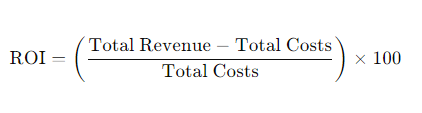
Email Marketing ROI

Where Net Profit is the revenue generated from the campaign minus the total cost of the campaign.

 Also read: How to Create a WordPress Backup? Step-by-Step solution

Email Marketing ROI

Key Metrics to Track:-

To measure email marketing ROI effectively, you should also monitor several key performance indicators (KPIs):

1. Open Rate:

The percentage of recipients who open your emails. A higher open rate often leads to better engagement and conversions.

2. Click-Through Rate (CTR):

The percentage of email recipients who click on links within your email. This metric helps gauge the effectiveness of your email content and design.

3. Conversion Rate:

The percentage of recipients who complete a desired action (e.g., making a purchase) after clicking through your email.

4. Bounce Rate:

The percentage of emails that couldn’t be delivered. High bounce rates can affect your sender’s reputation.

5. Unsubscribe Rate:

The percentage of recipients who opt out of your email list. Monitoring this helps you understand how your content resonates with your audience.

Tools to Measure Email Marketing ROI

To measure email marketing ROI effectively, leveraging the right tools is essential. Here are a few:

1. Email Marketing Platforms:

Tools like Mailchimp, Constant Contact, and SendinBlue offer built-in analytics to track ROI.

2. Google Analytics:

Use UTM parameters to track email campaigns and measure their impact on website traffic and conversions.

3. CRM Systems:

Customer Relationship Management systems help track customer interactions and sales data, providing a comprehensive view of ROI.

Tips for Improving Email Marketing ROI:-

1. Segment Your Audience:

Divide your email list into smaller segments based on demographics, behaviors, or preferences. Tailored emails can lead to higher engagement and conversions.

2. Personalize Your Emails:

Use personalization techniques such as addressing recipients by name and recommending products based on past purchases.

3. Optimize for Mobile:

Ensure your emails are mobile-friendly, as a significant portion of users access emails on their smartphones.

4. Test and Refine:

Continuously A/B test different elements of your emails (subject lines, content, images) to determine what works best

5. Use UTM Parameters:

Add UTM parameters to your email links to track the effectiveness of different campaigns in Google Analytics.

6. Regular Reporting:

Create regular reports to monitor performance over time and adjust your strategy as needed.

Know Your Email Marketing Goals:

Email marketing is a powerful tool for businesses looking to connect with their audience, drive engagement, and increase conversions. However, to make the most of your email marketing efforts, it’s essential to know your email marketing goals. Clear, well-defined goals not only guide your strategy but also provide a benchmark against which you can measure your success.

Why Setting Goals is Important:

Setting goals is crucial for several reasons:

1. Focus and Direction: Goals provide a clear focus and direction for your email marketing efforts. They help you understand what you want to achieve and how to allocate your resources effectively.

2. Performance Measurement: With defined goals, you can measure your performance accurately. This helps in understanding what works, what doesn’t, and where to make improvements.

3. Motivation and Accountability: Goals motivate your team to achieve specific outcomes and hold them accountable for their performance.

How to Set Effective Email Marketing Goals:-

To set effective email marketing goals, follow these steps:

1. Align with Business Objectives:

Ensure your email marketing goals align with your broader business objectives. This ensures that your efforts contribute to overall business success.

2. Make Goals SMART:

SMART goals are Specific, Measurable, Achievable, Relevant, and Time-bound. For example, instead of setting a goal to “increase open rates,” set a SMART goal to “increase open rates by 15% over the next three months.

3. Use Data to Inform Goals:

Analyze past email campaign performance and customer data to set realistic and informed goals. This helps in understanding what is achievable and what needs improvement.

4. Prioritize Goals:

Prioritize your goals based on their importance and impact on your business. This ensures you focus on the most critical objectives first.

5. Regularly Review and Adjust Goals:

Continuously monitor your progress towards your goals and adjust them as needed. This helps in staying responsive to changes in the market and customer behavior.

 Also read: How to Use VR in Web Design: Tools and Techniques

FAQ:

Q: What is email marketing ROI?

A: Email marketing ROI measures the profitability of your email campaigns by comparing the revenue generated to the costs incurred.

Q: How do I calculate email marketing ROI?

A: Use the formula:

Email Marketing ROI

Q: What are the key metrics to track for email marketing ROI?

A: Key metrics include open rate, click-through rate (CTR), conversion rate, bounce rate, and unsubscribe rate.

Q: What tools can help measure email marketing ROI?

A: Tools like Mailchimp, Google Analytics, and CRM systems are useful for tracking and measuring email marketing ROI.

Q: How can I improve my email marketing ROI?

A: Improve ROI by segmenting your audience, personalizing emails, optimizing for mobile, and continuously testing and refining your campaigns.

Q: What is a good ROI for email marketing?

A good ROI for email marketing varies by industry, but a common benchmark is a return of $38 for every $1 spent.

Conclusion:

Measuring email marketing ROI effectively is essential for optimizing your campaigns and ensuring that your marketing efforts are delivering the desired returns. By defining clear goals, tracking essential metrics, calculating costs, determining revenue, and using the right tools, you can gain valuable insights into your email marketing performance and make data-driven decisions to enhance your strategy.

Book  a consultation with us

VR in Web Design- HanuiT solutions

How to Use VR in Web Design: Tools and Techniques

How to Use VR in Web Design:

The digital landscape is ever-evolving, with new technologies constantly reshaping the way we interact online. One of the most groundbreaking advancements in recent years is Virtual Reality (VR). While traditionally associated with gaming and simulation, VR now makes significant inroads into web design. This article explores how VR in Web Design can be used in web design, the benefits it offers, and practical steps for integrating this immersive technology into your web projects.

Virtual Reality (VR) in web design refers to the use of VR technology to create immersive and interactive web experiences. Unlike traditional web interfaces, VR places users within a simulated environment, allowing them to engage with content more dynamically and intuitively. This integration of VR into web design can enhance user engagement, provide unique ways to present information and open up new possibilities for online interactions.

Essential VR in Web Design Tools:-

To effectively implement VR in web design, you’ll need to utilize specialized tools and frameworks. Here are some of the top tools for integrating VR into your web projects:

1. A-Frame:

A-Frame is an open-source web framework for building VR experiences. It simplifies the process of creating VR environments using HTML-like syntax.

Features:

1.Easy-to-use components.

2. cross-platform compatibility.

3. integration with various VR devices.

Use Case:

Ideal for creating immersive 3D scenes and interactive VR experiences directly in the browser.

2.Three.js:

Three.js is a JavaScript library that enables the creation of 3D graphics in the browser. It can be used to build complex VR environments and visualizations.

Features:

1. High-performance rendering.

2. extensive documentation.

3. a large community.

Use Case:

Best suited for advanced 3D modeling and rendering within VR environments.

 Also read: Best Top13 AI SEO Tools: Boost Rankings

3. WebVR API:

The WebVR API is a JavaScript API that allows web developers to create VR experiences directly within the browser.

Features:

1. Supports a range of VR devices.

2. provides access to VR hardware.

3. and integrates with other web technologies.

Use Case:

Useful for building VR experiences that require direct interaction with VR hardware.

4. Babylon.js:

Babylon.js is a powerful 3D engine that supports both WebGL and WebXR, enabling the creation of high-quality VR experiences.

Features:

1. Advanced rendering capabilities.

2. physics engine.

3. and extensive documentation.

Use Case:

Ideal for creating complex and interactive 3D environments in VR.

Benefits of VR in Web Design:-

1. Enhanced User Engagement: VR can significantly increase user engagement by offering an interactive and immersive experience that captures users’ attention and encourages them to explore content more deeply.

2. Improved User Experience: By simulating real-world environments or creating entirely new ones, VR can make user interactions more intuitive and enjoyable, leading to a better overall experience on your website.

3. Increased Conversion Rates: Immersive VR experiences can help boost conversion rates by offering a more compelling way to showcase products or services, making it easier for users to make informed decisions.

4. Innovative Marketing: VR opens up creative avenues for marketing, such as virtual product demonstrations, interactive advertisements, and virtual tours, which can help differentiate your brand and attract more attention.

Steps to Incorporate VR in Web Design:-

1. Assess Your Audience: Before integrating VR, consider whether your target audience has access to VR technology and if they would benefit from a VR-enhanced web experience.

2. Choose the Right Tools: Utilize VR-friendly design tools and platforms, such as A-Frame, Three.js, or the WebVR API, to develop and implement your VR content effectively.

3. Design for Accessibility: Ensure that your VR content is accessible to a broad audience by providing alternative experiences for users without VR capabilities and optimizing for various devices and browsers.

4. Optimize for Performance: VR content can be demanding on system resources, so it’s essential to optimize your website to ensure smooth performance and fast load times.

5. Test Thoroughly: Conduct extensive testing across different devices and browsers to ensure compatibility and a seamless experience for all users.

Challenges and Considerations:-

1. High Development Costs: Developing VR content can be expensive and time-consuming.

2. Technical Limitations: Not all users have access to VR technology, and performance issues can arise.

3. User Experience: Poorly designed VR experiences can be disorienting and frustrating for users.

Future of VR in Web Design:-

As VR technology continues to evolve, its application in web design will become more widespread. Advances in hardware and software will make VR more accessible and easier to implement, opening up new possibilities for creating immersive online experiences.

Practical Applications of VR in Web Design:-

 VR in Web Design

1. Virtual Tours: Real estate websites can offer virtual tours of properties, allowing potential buyers to explore homes from the comfort of their devices.

2. Product Demonstrations: E-commerce sites can use VR to provide 3D models of products that users can interact with, offering a more detailed view and enhancing the online shopping experience.

3. Interactive Storytelling: Media and entertainment websites can create immersive storytelling experiences that draw users into the narrative, making content more engaging.

4. Educational Experiences: Educational platforms can leverage VR to provide virtual field trips and interactive lessons, making learning more engaging and effective.

FAQs:-

Q: What is VR in web design?

A: VR in web design involves integrating Virtual Reality technology into websites to create immersive and interactive experiences.

Q: What tools are used for VR in web design?

A: Common tools for VR in web design include A-Frame, Three.js, and the WebVR API.

 Q: What are the benefits of using VR in web design?

A: Benefits include increased user engagement, improved user experience, higher conversion rates, and innovative marketing opportunities.

Q: What are some applications of VR in web design?

A: Applications include virtual property tours, 3D product demos, interactive storytelling, and virtual educational experiences.

Q: What challenges are associated with VR in web design?

A: Challenges include high development costs, technical limitations, and ensuring a positive user experience.

Q: How can I make my VR content accessible?

A: Make VR content accessible by ensuring compatibility with various devices and browsers and offering alternative experiences for users without VR technology.

Q: Is VR in web design suitable for all websites?

A: VR is particularly suited for websites that benefit from immersive experiences, such as real estate, e-commerce, media, and educational sites.

Conclusion:

The integration of VR in web design represents a significant leap forward in creating immersive and interactive online experiences. By leveraging VR technology, web designers can enhance user engagement, improve the overall experience, and explore innovative ways to present content. As VR technology continues to advance, its potential applications in web design will only expand, offering exciting new opportunities for creating unique and compelling online experiences.

Book  a consultation with us

AI SEO Tools- HanuiT solutions

Best Top13 AI SEO Tools: Boost Rankings

Top 13 AI SEO Tools for 2024: Elevate Your SEO Strategy:-

In the ever-evolving world of SEO, staying ahead of the curve is crucial. AI-driven SEO tools offer advanced features that can significantly enhance your search engine optimization strategy. Here’s a comprehensive guide to the top 13 AI SEO Tools that can help you optimize your website and achieve better search rankings.

Artificial Intelligence  AI SEO Tools have revolutionized the field of search engine optimization by leveraging advanced algorithms and machine learning techniques to enhance website visibility and performance. These tools automate complex tasks, provide data-driven insights, and offer predictive analytics, making SEO more efficient and effective. Understanding the theory behind AI SEO Tools is essential to appreciate their capabilities and how they can be utilized to optimize your SEO strategy.

 AI SEO Tools

1. Surfer SEO:

Surfer SEO leverages AI to provide data-driven insights for optimizing your content and improving search rankings.

Surfer SEO analyzes SERP data to offer precise on-page optimization recommendations. It compares your content with top-ranking pages to suggest improvements in keyword usage, content structure, and more. The AI-driven insights help you create high-quality, relevant content that aligns with current SEO trends.

2. Clearscope:

Clear scope utilizes AI to enhance content quality and relevance through comprehensive optimization
Clearscope analyzes top-ranking pages to recommend relevant keywords and topics, helping you create content that is comprehensive and valuable. It provides data-driven suggestions to improve your content’s readability and SEO effectiveness.

3. Frase:

Frase combines AI and natural language processing to streamline content creation and SEO research.

Frase generates content briefs, suggests keywords, and provides insights into user intent. It helps you create content that aligns with search queries and user needs, improving both SEO and user engagement.

4. BrightEdge:

BrightEdge is an enterprise-level SEO platform that uses AI to provide actionable insights and recommendations.

BrightEdge offers tools for keyword research, competitive analysis, and content optimization, all powered by AI. Its advanced analytics and predictive capabilities help large organizations enhance their SEO strategies and achieve better search rankings.

5.MarketMuse:

MarketMuse leverages AI to assist with content planning and optimization, ensuring high-quality output.

MarketMuse helps you create high-quality content by analyzing top-performing pages and suggesting improvements. It provides insights into content gaps and keyword opportunities, helping you craft content that stands out in search results.

 Also read: How to Optimize Website for Faster Loads

6.SEMrush:

SEMrush integrates AI to enhance its suite of SEO and SEM tools.
SEMrush offers a range of features including keyword research, site audits, and competitive analysis. AI-driven insights help users identify opportunities, track performance, and optimize their SEO strategies effectively.

7. Ahrefs:

Ahrefs combines AI with its extensive SEO toolset to provide in-depth data analysis and insights.
Ahrefs offers features for keyword research, backlink analysis, and site audits. Its AI-driven data analysis helps users improve their search engine rankings and understand their competitive landscape.8. Moz Pro:

Moz Pro incorporates AI to enhance its SEO tools and metrics.

Moz Pro provides features for keyword research, link building, and site audits, all powered by AI. It helps users track rankings, analyze competitors, and optimize their SEO efforts using proprietary metrics.

9. Scribe

Scribe leverages AI to enhance content optimization and streamline SEO workflows.

Scribe analyzes your content for SEO effectiveness, offering recommendations to improve keyword optimization, readability, and overall content strategy. It helps ensure your content aligns with SEO best practices.
10.NeuralText:

NeuralText uses AI for content generation and optimization, enhancing SEO performance.

NeuralText helps create and optimize content by analyzing search trends and user intent. It offers keyword suggestions and content recommendations, ensuring your content meets SEO and user engagement goals.

11. SEO Surfer:

SEO Surfer utilizes AI to analyze SERP data and optimize on-page SEO factors.
SEO Surfer provides a detailed analysis of top-ranking pages to help you optimize your content. It offers recommendations on keyword usage, content structure, and other on-page SEO elements.

12.WordLift:

WordLift uses AI to add semantic markup to content, improving its search visibility.

WordLift helps enhance content by integrating semantic data and structured markup. This AI-driven tool improves search visibility and relevance by providing insights and recommendations for optimizing content with semantic elements.

13. TextRazor:

TextRazor employs AI SEO Tools to analyze and extract meaningful insights from text.

TextRazor provides a detailed analysis of content topics, entities, and keywords. It helps improve content relevance and SEO by offering insights into textual data using advanced AI algorithms.

FAQ:

Q: How does Surfer SEO’s AI technology benefit content optimization?

A: It provides actionable recommendations based on SERP analysis, helping you align your content with top-performing pages.

Q: Can Surfer SEO assist with keyword research?

A: Yes, it offers insights into keyword usage and optimization opportunities.

Q: What does Clearscope do for content optimization?

A: It suggests keywords and topics based on analysis of high-ranking pages, helping you produce content that performs well in search results.

Q: How does Frase help with content briefs?

A: It generates detailed briefs based on SERP analysis and user intent, guiding your content creation process.

Q: What is BrightEdge’s Data Cube feature?

A: Data Cube provides extensive data on search trends, keywords, and competitors, helping you make informed SEO decisions.

Q: How does MarketMuse identify content gaps?

A: It analyzes existing content and competitors to pinpoint areas where additional or improved content is needed.

Q: How does SEMrush’s AI technology support site audits?

A: AI algorithms identify technical issues and provide recommendations to improve your site’s SEO health.

Q: How does Ahrefs assist with backlink analysis?

A: It provides detailed information on backlinks, including quality metrics and historical data.

Q: How does TextRazor analyze text?

A: It uses AI to extract topics, entities, and keywords from content, providing insights for optimization.

Q: What is semantic markup in WordLift?

A: Semantic markup adds structured data to your content, helping search engines understand its context and relevance.

Conclusion:

Incorporating AI into your SEO strategy can dramatically enhance your website’s performance and search visibility. These 13  AI SEO Tools provide a range of features from content optimization and keyword research to competitor analysis and site audits. By leveraging these advanced technologies, you can streamline your SEO processes, make data-driven decisions, and achieve better search engine rankings.

Book  a consultation with us

Web Design- HanuiT solutions

What are the New Trends in Web Design in 2024

New Trends in Web Design in 2024

The world of Web Design is constantly evolving, with new trends emerging each year that reflect changes in technology, user behavior, and design aesthetics. As we move into 2024, several key trends are shaping the way websites are designed and developed. This article will explore the latest trends in web design for 2024, offering insights into what’s popular and why these trends are important for creating modern, engaging, and effective websites.

1. AI-Powered Design Tools:

Artificial Intelligence (AI) is making a significant impact on Web Design, offering tools that enhance creativity and streamline the design process. In 2024, AI-powered design tools are at the forefront of Web Design trends.

AI-powered design tools are transforming how designers approach their work. These tools can automate repetitive tasks, suggest design improvements, and even generate content based on user input. For example, AI can analyze user behavior to suggest layout changes or provide design recommendations tailored to specific audiences. This allows designers to focus more on creative aspects and less on technical details.

2. Dark Mode and Customizable Themes:

Web Design

Dark mode has gained popularity in recent years, and in 2024, it remains a prominent trend in Web Design. Additionally, customizable themes are becoming increasingly important as users seek personalized experiences.

Dark mode reduces eye strain and can improve readability in low-light environments. Many websites now offer dark mode as an option, allowing users to switch between light and dark themes based on their preferences. Customizable themes take this a step further by allowing users to adjust colors, fonts, and layouts according to their tastes. This personalization enhances user engagement and satisfaction.

3. Immersive 3D and Interactive Elements:

The integration of 3D graphics and interactive elements is becoming increasingly prevalent in Web Design. This trend adds a layer of immersion and engagement that traditional 2D designs cannot match.
Immersive 3D elements and interactive features such as animations and parallax scrolling provide a dynamic and engaging user experience. These elements can be used to create visually stunning websites that captivate users and encourage longer site visits. Advances in web technologies such as WebGL and WebXR, have made it easier to incorporate 3D graphics and interactive features into websites.

4. Minimalist and Functional Design:

Minimalist design continues to be a dominant trend in 2024, with a focus on simplicity and functionality. This approach emphasizes clean lines, ample white space, and straightforward navigation.

The minimalist design prioritizes essential content and functionality, reducing clutter and focusing on what truly matters. This design philosophy helps users find information quickly and easily improving overall usability. By stripping away unnecessary elements, minimalist design enhances visual appeal and makes websites more accessible.

5. Sustainability and Eco-Friendly Design:

Sustainability is becoming an important consideration in Web Design, with a growing emphasis on eco-friendly practices and reducing the environmental impact of websites.

Sustainable Web Design involves optimizing websites for energy efficiency and reducing their carbon footprint. This can be achieved through practices such as minimizing the use of heavy images and videos, optimizing code for faster load times, and choosing green hosting providers. By adopting eco-friendly design practices, designers can contribute to a more sustainable digital ecosystem.

 Also read: What is local SEO and How we can improve it

6. Voice User Interface (VUI) Design:

Voice User Interfaces (VUI) are gaining traction in Web Design as voice interactions become more prevalent with the rise of smart speakers and voice assistants.
UI design involves creating interfaces that allow users to interact with websites using voice commands. This trend reflects the growing popularity of voice assistants like Amazon Alexa, Google Assistant, and Apple Siri. Implementing VUI in web design can enhance accessibility and provide a more convenient way for users to interact with websites, especially on mobile devices.

7. Enhanced Mobile Responsiveness:

Mobile responsiveness remains a critical focus in Web Design, with an increasing emphasis on delivering seamless experiences across various devices and screen sizes.

Enhanced mobile responsiveness involves optimizing websites to ensure they perform well on smartphones, tablets, and other mobile devices. This includes designing flexible layouts, optimizing images, and ensuring fast load times. With mobile traffic continuing to rise, providing a consistent and user-friendly experience across all devices is essential for retaining users and improving engagement.

8. Personalized User Experiences:

Personalization in Web Design is becoming more sophisticated, tailoring content to individual users.
Websites now use data to customize content, recommendations, and interfaces based on user behavior and preferences, creating a more relevant and engaging experience.

9. Advanced Typography:

Typography continues to evolve with more creative and experimental approaches.
Custom fonts and innovative typography techniques are used to create unique brand identities and enhance visual appeal

FAQ:

How do AI-powered design tools work?

AI tools use algorithms to analyze data and provide insights or suggestions. They can automate tasks like color matching, layout adjustments, and even content creation.

Why is dark mode popular?

Dark mode is popular because it reduces eye strain and can extend battery life on OLED screens. It also provides a sleek, modern aesthetic.

What technologies enable 3D elements in web design?

Technologies like WebGL, WebXR, and Three.js enable the integration of 3D graphics and interactive elements in web design.

What are the benefits of minimalist design?

Minimalist design improves usability by reducing clutter, enhances visual appeal with clean lines, and helps users focus on essential content

What is sustainable web design?

Sustainable web design focuses on reducing the environmental impact of websites by optimizing performance and using eco-friendly practices.

Mobile responsiveness is crucial because it ensures that websites function well on all devices providing a consistent user experience and accommodating the growing number of mobile users.

How is user data used for personalization?

User data such as browsing history and preferences is analyzed to provide tailored content and recommendations.

Conclusion:

The trends in Web Design for 2024 highlight the evolving landscape of technology and user preferences. AI-powered tools are enhancing the design process, while dark mode and customizable themes offer users greater control and comfort. Immersive 3D elements and interactive features are creating more engaging experiences, and minimalist design continues to emphasize clarity and usability. Additionally, sustainability is becoming an integral part of Web Design, with a focus on reducing environmental impact.

Book  a consultation with us

Website for Faster Loads- HanuiT solutions

How to Optimize Website for Faster Loads

How Can You Optimize Your Website for Faster Loads Times:

In today’s fast-paced digital world, website speed is crucial. A fast-loading website not only improves user experience but also boosts search engine rankings and reduces bounce rates. This guide will walk you through various techniques to optimize your Website for Faster Loads, ensuring your visitors have a seamless experience.

Website speed optimization is essential for retaining visitors and enhancing the overall performance of your site. Slow websites can frustrate users, leading to higher bounce rates and lower conversion rates. By optimizing your website’s load times, you can provide a better user experience and improve your site’s search engine ranking.

Techniques for Optimizing Websites for Faster Loads:

1. Minimize HTTP Requests:

Every element on a webpage, such as images, scripts, and stylesheets, requires an HTTP request to load. Reducing the number of these requests can significantly improve load times. To minimize HTTP requests, combine CSS and JavaScript files, use image sprites, and eliminate unnecessary elements.

Steps:

Combine Files: Merge multiple CSS and JavaScript files into one.

Use Image Sprites: Combine multiple images into a single file to reduce server requests.

Remove Unnecessary Elements: Eliminate redundant or unused elements from your webpage.

2. Optimize Images:

Images are often the largest files on a webpage and can greatly affect load times. Optimizing images involves compressing them without compromising quality and using appropriate formats.

Steps:

Compress Images: Use tools or plugins to reduce image file sizes.

Use the Right Format: Choose between JPEG, PNG, or WebP based on image type and quality needs.

Implement Responsive Images: Use responsive image techniques to ensure images are appropriately sized for different devices.

3. Enable Browser Caching:

Browser caching allows a website to store certain files locally in a user’s browser, so they don’t need to be downloaded again on subsequent visits. This can lead to faster load times for returning visitors.

Steps:

Set Cache Expiry Dates: Define how long browsers should cache files using HTTP headers.

Leverage Caching Plugins: Use plugins or server settings to manage caching rules efficiently.

Test Caching Configuration: Regularly check your caching setup to ensure it’s functioning correctly.

4. Use a Content Delivery Network (CDN):

A CDN distributes your website’s content across multiple servers worldwide. By serving content from the nearest server to the user, a CDN can significantly reduce load times and improve site performance.

Steps:

Choose a CDN Provider: Select a reputable CDN provider based on your needs and budget.

Integrate CDN: Set up your website to deliver content via the CDN.

Monitor Performance: Regularly review CDN performance and make adjustments as needed.

5. Minify CSS, JavaScript, and HTML:

Minification involves removing unnecessary characters, such as spaces and comments, from your code. This reduces file sizes and can improve load times.

Steps:

Use Minification Tools: Apply minification tools or plugins to your CSS, JavaScript, and HTML files.

Automate the Process: Set up automated processes to minimize files during deployment.

Test After Minification: Ensure that minifying files don’t break your website’s functionality.

6. Improve Server Response Time:

Server response time is the duration it takes for a server to respond to a request from a browser. Faster server response times contribute to quicker load times.

Steps:

Choose a Reliable Hosting Provider: Select a hosting service known for its fast performance and reliability.

Optimize Server Configuration: Fine-tune server settings and use performance-enhancing features.

Monitor Server Performance: Regularly check server response times and make necessary improvements.

7. Implement Asynchronous Loading for JavaScript:

Asynchronous loading allows JavaScript files to load in the background without blocking the rendering of the webpage. This can lead to faster page load times and improved user experience.

Steps:

Use async or defer Attributes: Add async or defer attributes to your script tags.

Test Compatibility: Ensure that asynchronous loading does not cause conflicts with other scripts or functionalities.

Monitor Performance: Evaluate the impact of asynchronous loading on your page’s speed and adjust as needed.

8. Optimize Your Database:

A well-optimized database can improve the speed of dynamic websites by reducing query times and server load.

 Also read: What is Software Development Lifecycle

Steps:

Regularly Clean Up Database: Remove unnecessary data and optimize database tables.

Use Indexing: Implement proper indexing to speed up data retrieval.

Monitor Database Performance: Regularly check and optimize database performance.

9. Enable Compression:

Compression reduces the size of files sent from your server to visitors’ browsers, speeding up the load time.

Enable Gzip or Brotli compression on your server to compress HTML, CSS, and JavaScript files.

Use server-side compression tools and ensure they are configured correctly.

Regularly monitor your website’s performance to ensure compression is effectively reducing load times.

Benefits of Optimizing Your Website for Faster Loads:

1. Improved User Experience:

Faster Navigation:  Users can browse your site more efficiently without waiting for pages to load.

Lower Bounce Rates: Visitors are less likely to leave your site if it loads quickly, leading to higher engagement and retention.

2. Higher Search Engine Rankings:

Google PageSpeed Insights: Google considers page speed as a ranking factor. Faster websites are more likely to rank higher in search results.

Better SEO Performance: A well-optimized website is more easily indexed by search engines, improving your overall SEO strategy.

3. Increased Conversion Rates:

Enhanced Shopping Experience: For e-commerce sites, faster load times mean a smoother shopping experience, leading to higher sales.

Reduced Cart Abandonment: Faster pages reduce the likelihood of customers abandoning their shopping carts due to slow load times.

4. Better Mobile Performance:

Responsive Design: Optimization ensures that your website performs well on mobile devices, which is crucial as mobile traffic continues to grow.

Accelerated Mobile Pages (AMP): Implementing AMP can significantly improve load times on mobile devices, enhancing the user experience.

FAQ:

How does website speed affect my business?

Website speed is crucial for user experience and SEO. Website for Faster Load times leads to higher user satisfaction, increased engagement, and better search engine rankings.

What techniques do you use to optimize a Website for Faster Loads?

We use a variety of techniques, including code minification, image optimization, server response time reduction, CDN integration, and caching solutions.

Can you optimize any type of website?

Yes, we can optimize websites built on various platforms, including WordPress, Shopify, Magento, and custom-built sites.

Conclusion:

Optimizing your Website for Faster Loads is a crucial step in enhancing user experience and boosting your site’s performance. By implementing these strategies, you can ensure your Website for Faster Loads quickly, retains visitors, and performs better in search engine rankings. Regularly review and update your optimization practices to keep your site running at its best. Embrace the power of speed and watch your website thrive in the digital landscape!

Book  a consultation with us

Array in Java- HanuiT solutions

How to Create an Array in Java

Creating an Array in Java

Array in Java is a fixed-size, ordered collection of elements of the same data type. It allows you to store multiple values of the same type under a single variable name, making it easier to manage and manipulate related data.

Arrays in Java are declared using square brackets after the data type. They can hold primitive data types (like int, float, etc.) or objects (like String or custom classes). Once created, the size of the array is fixed and cannot be changed. Elements within the array are accessed using zero-based indexing.

what is an Array in Java?

In Java, an array is a data structure that allows you to store a fixed-size collection of elements of the same type. It provides a way to group multiple variables of the same data type under a single name for easier manipulation and access.

Here are some key characteristics and features of arrays in Java:

 Also read: What is the Software Development Lifecycle

1. Fixed Size: Once you create an array in Java with a specific size, that size cannot be changed. This fixed size distinguishes arrays from other data structures like ArrayList, which can dynamically resize themselves.

2. Ordered Collection: Array in Java maintains the order of elements based on their indices. The first element is stored at index 0, the second at index 1, and so on. This sequential order allows for efficient access and manipulation of elements.

3. Single Data Type: The array in Java can only store elements of the same data type. For example, you can have an array of integers (int[]), an array of strings (String[]), or an array of custom objects (MyObject[]). Mixing different data types within the same array is not allowed.

4. Declaration and Initialization: Array in Java are declared by specifying the type of elements they will hold, followed by square brackets [], and then the array name. They are initialized using the new keyword to allocate memory for the array and specify its size.

Example:

int[] numbers = new int[5]; // declares and initializes an array of integers with size 5

Accessing Elements: Elements within an array are accessed using zero-based indexing. You can retrieve or modify elements by specifying their index within square brackets [].

Example:

numbers[0] = 10; // assigns the value 10 to the first element of the numbers array
int x = numbers[2]; // retrieves the value stored in the third element of the numbers array

Length Property: Every array in Java has a length property that indicates the number of elements it can hold. This property is accessed using arrayName.length.

Example:

int[] numbers = new int[5];
int arrayLength = numbers.length; // array length will be 5

How to Declare and Initialize an Array in Java in a Single Statement:

In Java, you can declare and initialize an array in a single statement using the following syntax:

syntax

dataType[] arrayName = new dataType[]{element1, element2, …, elementN};

Here’s a breakdown of each part of the syntax:

1. dataType: This specifies the type of elements that the array will hold. It can be a primitive data type (like int, double, char, etc.) or a reference type (like String, Object, custom classes, etc.).
2. arrayName: This is the identifier that you choose for your array variable
.
3. new dataType[]: This part creates a new array object of the specified data type. The square brackets [] denote that it’s an array.

4. {element1, element2, …, elementN}: This is the array initializer, where you list the initial values that the array will hold. These values are enclosed in curly braces {} and separated by commas.

Examples:

1. Integer Array

Example:

int[] numbers = new int[]{1, 2, 3, 4, 5};

Here, numbers is an integer array initialized with values{1, 2, 3, 4, 5}.

2. String Array

Example:

String[] weekdays = new String[]{“Monday”, “Tuesday”, “Wednesday”, “Thursday”, “Friday”};

Here, weekdays is a string array initialized with the days of the week.

3. Double Array

Example:

double[] prices = new double[]{19.99, 29.99, 39.99};

Here, prices is a double array initialized with some price values.

Notes:

If you know the size of the array but not its contents at the time of declaration, you can omit the size inside the square brackets and just use {} for initialization. The size will be determined by the number of elements provided in the initializer.

int[] numbers = {1, 2, 3, 4, 5}; // Declaration and initialization without specifying size

It’s also possible to declare an array variable first and then initialize it later using an array initializer or by assigning individual elements.

int[] numbers; // Declaration
numbers = new int[]{1, 2, 3, 4, 5}; // Initialization

This approach of declaring and initializing arrays in a single statement is concise and commonly used when you know the initial values of the array at the time of declaration.

Array in Java

Advantages of Arrays in Java:

1. Efficient Access: Arrays provide direct access to elements using their index, resulting in fast retrieval and modification operations.

2. Memory Efficiency: Arrays allocate contiguous memory locations for elements, ensuring efficient memory usage compared to some dynamically allocated data structures.
3. Simplicity: Arrays have a straightforward syntax for declaration and usage in Java, making them easy to understand and implement.

Disadvantages of Arrays in Java:

1. Fixed Size: Arrays have a fixed size once created, and their size cannot be changed dynamically during runtime, which can lead to either wasted memory or insufficient space for elements.

2. Lack of Flexibility: Arrays store elements of the same type and have a fixed size, limiting their flexibility compared to dynamic data structures like ArrayList or LinkedList.

3. Overhead for Insertions and Deletions: Inserting or deleting elements in the middle of an array requires shifting existing elements, resulting in inefficient operations with time complexity O(n).

FAQ:

How do you declare an array in Java?

Arrays are declared by specifying the type of elements followed by square brackets and then the array name. For example, int[] myArray; declares an array named myArray that can hold integers.

Can arrays in Java store different types of data?

No, arrays can only store elements of the same type. If you need to store different types, consider using arrays of objects (like Object[]) or collections like ArrayLists.

How do you initialize an array in Java?

Arrays can be initialized using either an array initializer or using the new keyword. For example, int[] myArray = {1, 2, 3}; initializes an array with three integers.

What happens if you access an index that is out of bounds in an array?

Java will throw an ArrayIndexOutOfBoundsException at runtime if you try to access an index that does not exist in the array.

Conclusion:

Arrays are fundamental in Java programming for organizing and managing collections of data efficiently. They provide a structured way to store and access elements of the same type, making them essential for a wide range of applications from basic data storage to complex algorithms. Understanding how to declare, initialize, and manipulate arrays in Java is crucial for developing effective Java programs

Book  a consultation with us

Software Development Lifecycle- HanuiT solutions

What is Software Development Lifecycle

Software Development Lifecycle (SDLC)

Software Development Lifecycle (SDLC) is a structured process for software development teams to follow, ensuring software is created with high quality, on time, and within budget. This cycle encompasses planning, creation, testing, deployment, and maintenance of software.

SDLC outlines a series of steps software developers follow to design, develop, test, and deploy software efficiently. Each phase in the SDLC has its unique process and deliverables.

what is the Software Development Lifecycle (SDLC)

Software Development Lifecycle (SDLC) refers to the process or methodology used by software development teams to design, develop, test, deploy, and maintain software applications. It provides a structured approach to software development, ensuring that projects are completed efficiently, on time, and within budget, while meeting the required quality standards.

 Also read: What Is Content Management Systems

Stages of the Software Development Life Cycle (SDLC)

1. Requirements Gathering and Analysis

This stage involves gathering requirements from stakeholders, users, and other sources. The goal is to understand what the software should accomplish and define its functional and non-functional requirements. Requirements are documented in detail to ensure clarity and to serve as a foundation for the next stages.

Activities:

1. Conducting interviews and workshops with stakeholders.

2. Analyzing existing systems (if applicable).

3. Documenting requirements in a Requirements Specification document.

2. Planning:

The planning phase involves outlining the project scope, defining the timeline, allocating resources, and creating a project plan. Project managers and team leads determine tasks, milestones, and deliverables for each phase of the Software Development Lifecycle.

Activities:

1. Defining project goals and objectives.

2. Creating a project schedule and timeline.

3. Allocating resources (human, financial, and technological).

3. Design

 In the design phase, the software architecture is developed based on the requirements gathered. This phase involves designing the overall structure of the software, including databases, user interfaces, application modules, and system interfaces.

Activities:

1. Creating architectural design diagrams (e.g., UML diagrams).

2. Designing database schema and data models.

3. Designing user interface (UI) and user experience (UX).

4. Creating prototypes or mockups for visualization.

4. Testing

Testing is a critical phase where the software is tested thoroughly to identify and fix defects or issues before it is released to users. activities include various levels such as unit testing, integration testing, system testing, and user acceptance testing (UAT). The goal is to ensure the software meets quality standards and performs as expected.

Activities:

1. Developing test plans and test cases based on requirements.

2. Performing different types of testing (e.g., functional, performance, security).

3. Reporting and fixing bugs identified during testing.

5. Deployment 

Deployment involves making the software available for users in a production environment. It includes activities such as installation, configuration, and setup of the software system. Deployment planning ensures a smooth transition from development to operations.

Activities:

1. Creating deployment plans and schedules.

2. Installing and configuring the software on production servers.

3. Conducting user training and providing documentation.

6. Maintenance

Once the software is deployed, it enters the maintenance phase where it is maintained and supported throughout its lifecycle. This phase includes fixing bugs reported by users, making enhancements or updates to the software, and ensuring it continues to meet user needs.

Activities:

1. Providing technical support to users.

2. Monitoring and optimizing software performance.

3. Implementing patches, updates, and new features as required.

7. Development

The development phase is where the actual coding and programming of the software take place. Developers write code according to the design specifications and coding standards defined in earlier phases. This phase also includes unit testing to verify individual components.

Activities:

1. Writing code in the chosen programming languages (e.g., Java, Python, C++).

2. Implementing features and functionalities based on design documents.

Software Development Life Cycle (SDLC) models

Software Development Lifecycle

1. Waterfall Model

The Waterfall model is a linear and sequential approach to software development. It progresses through distinct phases, including Requirements Analysis, Design, Implementation, Testing, Deployment, and Maintenance. Each phase must be completed before moving on to the next, making it rigid and less adaptable to changes once development has started.

2.  Agile Model

The Agile model is an iterative and incremental approach to software development. It emphasizes flexibility, collaboration, and customer feedback throughout the development process. Agile methods involve iterative cycles (sprints) of planning, development, testing, and review, allowing for continuous improvement and adaptation to changing requirements.

3. Spiral Model

The Spiral model combines elements of the Waterfall model and iterative development. It allows for incremental releases of the product, with each iteration (or spiral) encompassing risk assessment, planning, engineering, and evaluation. The Spiral model emphasizes early identification and mitigation of risks through iterative refinement.

4. DevOps Model

DevOps is a cultural and operational approach that bridges the gap between development (Dev) and operations (Ops). It aims to automate and integrate the processes between software development, IT operations, and quality assurance (QA) teams. DevOps promotes continuous integration, continuous delivery (CI/CD), and continuous monitoring to achieve faster development cycles, improved deployment frequency, and more reliable releases.

5. V-Model (Verification and Validation Model)

The V-Model is an extension of the Waterfall model that emphasizes the verification and validation of each phase of development. It pairs each development stage with a corresponding testing phase, forming a V-shaped structure. This model ensures that testing activities are integrated throughout the entire SDLC.

6. Incremental Model

The Incremental model divides the development of software into smaller, manageable segments or increments. Each increment builds upon previous functionality, allowing for incremental development, testing, and deployment. This model enables early delivery of partial functionality and is useful for projects where requirements are not fully known upfront.

7. RAD Model (Rapid Application Development Model)

The RAD model is focused on rapid prototyping and iterative development of software. It emphasizes an accelerated development cycle, where prototypes are quickly developed and reviewed by stakeholders. RAD promotes user feedback and iterative refinements to deliver software rapidly and efficiently.

FAQ:

Why is the Software Development Lifecycle important?

Software Development Lifecycle ensures structured development, reduces risks, improves collaboration, and delivers high-quality software.

What are the different Software Development Lifecycle models?

Common models include Waterfall, Agile, Spiral, and DevOps, each with its approach to development phases.

How does the Software Development Lifecycle help manage project risks?

By defining clear phases and deliverables, SDLC helps identify and mitigate risks early in the development process.

Conclusion

The Software Development Lifecycle (SDLC) provides a systematic framework for developing software applications. By following the Software Development Lifecycle SDLC phases—planning, analysis, design, development, testing, deployment, and maintenance—teams can ensure efficient project management, high-quality deliverables, and customer satisfaction. Understanding Software Development Lifecycle SDLC models and adapting them to project requirements is crucial for successful software development in today’s dynamic environments.

Book  a consultation with us

UX Designer- HanuiT solutions

How To Become UI UX Designer

UI/UX Designer

As a UI UX Designer, I specialize in creating intuitive and visually appealing interfaces that enhance user experience across digital platforms. My expertise lies in understanding user behaviors, designing wireframes, and crafting seamless interactions that align with client objectives.

What is UX Design

UX Design refers to the process of enhancing user satisfaction by improving the usability, accessibility, and pleasure provided in the interaction between a user product. It encompasses all aspects of the user’s interaction with the company, its services, and its products. UX Design involves understanding user behaviors, needs, and motivations through various research methods, such as user interviews, surveys, and usability testing.

What is UI Design

UI Design, or User Interface Design, is the process of designing the visual elements of a product or application that users interact with. It focuses on creating intuitive, aesthetically pleasing interfaces that facilitate user interaction and navigation. UI Design is a crucial aspect of the overall User Experience (UX) Design process, as it directly impacts how users perceive and interact with a digital product.

What Do UX Designers Do

UX Designers play a crucial role in the development of digital products and services, focusing on creating user-centered experiences that meet both user needs and business objectives. Here are the key responsibilities and activities that UX Designers typically engage in.

1. User Research

UX Designers conduct extensive user research to understand users’ behaviors, goals, motivations, and pain points. This involves methods such as interviews, surveys, observational studies, and analysis of user data. The insights gathered from research inform design decisions and ensure that the product meets user expectations.

2. Persona Development

Based on user research findings, UX Designers create user personas. Personas are fictional representations of different user types, incorporating demographics, behaviors, and goals. Personas help UX Designers empathize with users and design solutions that cater to their specific needs and preferences.

3. Information Architecture

UX Designers design the information architecture (IA) of a product, which involves organizing and structuring content in a way that is logical, intuitive, and easy to navigate. This includes creating sitemaps, defining navigation flows, and establishing content hierarchies to ensure users can find information quickly and efficiently.

4. Wireframing and Prototyping

UX Designers create wireframes and prototypes to visualize and iterate on design concepts. Wireframes are low-fidelity interface representations, focusing on layout and content structure. Prototypes, on the other hand, are more detailed and interactive, allowing UX Designers to test functionality and gather feedback from users and stakeholders.

5. Interaction Design

UX Designers design the interaction patterns and behaviors within a product’s interface. This includes designing elements such as buttons, forms, menus, and navigation flows to ensure they are intuitive, efficient, and aligned with user expectations. Interaction design aims to create seamless and enjoyable user experiences.

What Do UI Designers Do

UI Designers are responsible for designing the visual elements of a digital product or application, focusing on creating interfaces that are visually appealing, intuitive to use, and aligned with user needs and business goals. Here are the key responsibilities and activities that UI Designers typically engage in.

1. Visual Design

UI Designers create visually appealing interfaces by designing elements such as colors, typography, icons, and imagery. They ensure that the visual style and aesthetic of the product align with the brand identity and target audience preferences.

2. Layout Design

UI Designers design the layout of the interface, arranging elements such as buttons, menus, and content blocks in a way that enhances usability and guides users through the product experience. They consider principles of visual hierarchy and spacing to create balanced and structured layouts.

3. Responsive Design

UI Designers ensure that the interface is responsive and adapts seamlessly to different screen sizes and devices. They design flexible layouts and elements that maintain usability and visual coherence across desktops, tablets, and mobile devices.

 Also read: What is the Software Development Lifecycle

4. Interaction Design

UI Designers design interactive elements within the interface, such as buttons, forms, sliders, and animations. They focus on creating intuitive and engaging interactions that facilitate user actions and enhance the overall user experience.

5. Prototyping and Iteration

UI Designers create prototypes and mockups to visualize design concepts and demonstrate interactions. Prototypes help UI Designers test and iterate on designs based on user feedback and usability testing results, ensuring that the final interface meets user expectations.

UX Designer

How to Become a UI UX Designer

1. Educate Yourself: Gain foundational knowledge in design principles and UX methodologies through formal education or self-study.

2. Develop Skills: Practice using design tools like Adobe XD, Sketch, or Figma for UI design, and learn UX processes such as user research and prototyping.

  Also read: Cloud Computing Architecture

3. Build a Portfolio: Create projects to showcase your design process, problem-solving abilities, and understanding of user-centered design.

4. Gain Experience: Seek internships, freelance projects, or volunteer opportunities to apply your skills and learn from real-world challenges.

5. Stay Updated: Keep abreast of industry trends, attend workshops, and network with professionals to continuously evolve your skills and knowledge

.6. Prepare for Jobs: Tailor your resume, polish your portfolio, and practice interview skills to land your first job as a UI/UX Designer.

FAQ

What does a UI/UX Designer do?

A UI/UX Designer focuses on creating user-centered designs for websites, mobile apps, and other digital interfaces. They collaborate with stakeholders to understand user needs, design wireframes, and prototypes, conduct usability testing, and iterate designs based on feedback.

What skills are important for a UI/UX Designer?

Key skills include proficiency in design tools (e.g., Adobe XD, Sketch), knowledge of UX principles (such as information architecture and usability), strong communication abilities to collaborate with teams and stakeholders, and a deep understanding of current design trends and technologies.

How does UI differ from UX design?

UI (User Interface) design focuses on the look and feel of a product’s interface, including elements like colors, typography, and layout. UX (User Experience) design involves the entire process of enhancing user satisfaction by improving usability, accessibility, and pleasure provided in the interaction with the product.

Conclusion

UI/UX Designer, I am committed to creating designs that not only meet but exceed user expectations. By leveraging my skills in user research, wireframing, prototyping, and usability testing, I ensure that every digital product I design is functional and aesthetically pleasing. My goal is to deliver intuitive interfaces that enhance user experience and achieve the strategic objectives of my clients effectively.

Book  a consultation with us